Bicep Heart Template: One Photo, One Small Gesture
A little flex turns into a heart. Use the Bicep Heart template with a photo of yourself or a consenting adult to create a short vertical video of that change. One arm lifts into a flex; the opposite hand curves beside the bicep until a small heart takes shape.
Watch the reference, choose a photo with room around the shoulders, and check the settings before creating. The Bicep Heart AI template supplies the prepared movement, so you can start without writing a prompt or filming the pose yourself.
Create your Bicep Heart video
Your photo uploads only when you choose Generate.
What this Bicep Heart template is built to do
The Bicep Heart template gives your portrait a specific action to follow. Its defining detail is the small heart made by one bent arm and the other hand. A smile or a slight change in expression can help the moment feel playful, but the arm and hand shape is what makes the gesture recognizable.
Think of the Bicep Heart AI template as a prepared direction for a new generated clip. Your photo provides the starting information about the person. The effect guides the action. The result can change facial details, clothing, fingers and proportions as the person moves.
The reference video shows the intended gesture. It is original trend footage, not a result produced by this generator. Use it to understand the movement and camera framing before deciding whether to try the effect with your picture.
Read the gesture in three beats
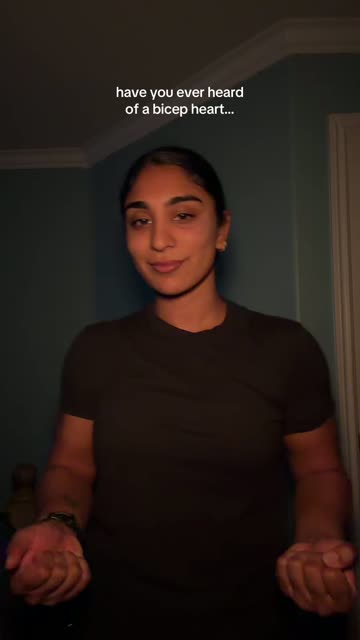
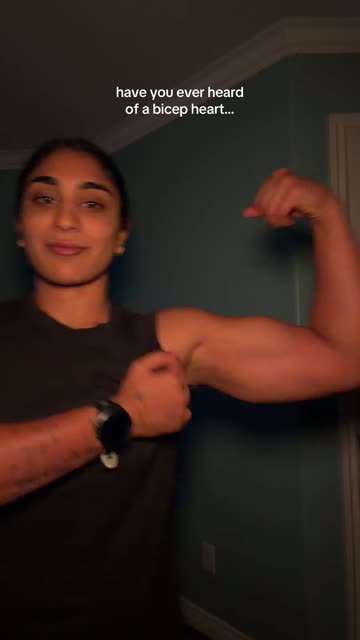
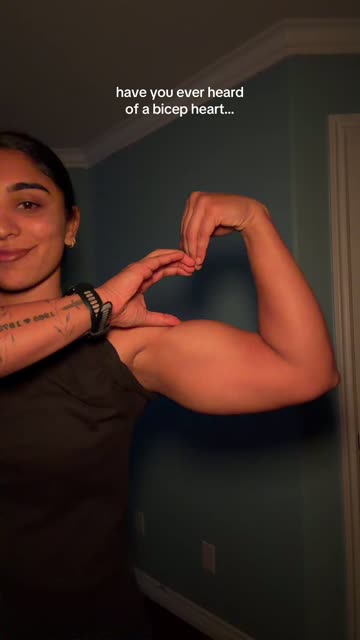
Frames from the original trend reference. These pictures show the gesture; they are not results from this generator.
1. A relaxed beginning
A clear starting pose gives the gesture somewhere to go. Notice the space around the shoulders and the direction of the face in the reference. A photograph with a similar amount of upper body in view gives the Bicep Heart template more visual information than a tightly cropped face.
2. One arm becomes the frame
The arm bends upward into a flex. Follow its outline from shoulder to elbow to wrist. This curved shape creates part of the heart. The Bicep Heart template does not depend on having large muscles; the position and visible outline matter more than the size of the arm.
3. The other hand closes the shape
The opposite hand moves toward the bicep and helps define the small heart. The final pose should remain readable for a moment. This is the detail to look for when reviewing your generated video: can you understand the heart without pausing and searching for it?
Your choices and the prepared effect
The Bicep Heart AI template keeps the creation process focused. You choose the person’s photo and the available video quality. The prepared effect supplies the gesture, and the output uses the site’s short vertical format.
| Part of the clip | What to expect |
|---|---|
| Starting person | Guided by one adult’s photo |
| Gesture | A prepared flex followed by the small arm-and-hand heart |
| Length and shape | Approximately 7 seconds in vertical 9:16 |
| Quality | A choice of 480p or 720p |
| Download | An MP4 file to review and save |
| Fine details | Face, fingers, clothing and movement can vary |
Those settings describe the available format. They do not guarantee an exact copy of the reference or of every detail in your photograph. Choosing 720p gives you a larger image; it does not promise better hand anatomy or a closer facial match.
This prepared template does not include a prompt box. To write and revise the movement yourself, use a separate tool that accepts text instructions.
Give the Bicep Heart template enough room
Choose a well-lit picture with a clear face, visible shoulders and as much of both arms as practical. Leave some space around the elbows instead of cropping directly against the body. The Bicep Heart template involves movement across the upper body, so a wider portrait offers a more useful starting point than an extreme close-up.
Your arms can be relaxed in the starting picture. You do not need to perform the completed heart before uploading. A simple background and visible body outline can make the pose easier to read, especially when one hand crosses toward the other arm.
Avoid pictures where sunglasses, a phone or strong filters hide the face. Choose one adult rather than a group. The uploader accepts JPG, PNG or WebP files up to 10 MB. If your favourite photo is a close selfie, look for a wider version before committing to a generation.
Use the Bicep Heart AI template
Start with the photo you want to animate. Check its preview, sign in with Google, and choose your resolution. The current Bicep Heart template uses 10 credits for a 480p clip or 20 credits for a 720p clip. The required credits appear before generation; current packs and prices are available separately.
Confirm that you have permission to use the adult’s photo, then create the clip through the uploader. Selecting a photo is not the same as starting a generation: the site uploads it for processing when you choose Generate.
When your video is ready, watch the whole result before downloading. You can return to My videos with the same account to access your work. Download a copy within 7 days of completion. For the full sequence, including choosing an input and finding your result, follow the Bicep Heart video tutorial.
Check the heart before you share it
The most useful review starts with the movement. Does one arm rise into a readable flex? Does the opposite hand move toward that arm? Is the small heart visible at the end? The Bicep Heart template should be judged on those details as well as the face.
Then follow the wrist as the hand approaches the bicep. Look for a visible gap that reads as a heart, rather than judging the effect from the smile alone. The gesture is the reason to choose this particular template.
Finally, check the framing and any sound in the downloaded file. Music heard in a reference preview does not establish what your export contains or what you may use in a post. Add captions and any permitted audio in your chosen publishing app after reviewing the MP4.
Choose a message that fits the gesture
A Bicep Heart template can suit a playful reply to a partner, a friendly hello or a softer ending to a gym update. The clip is short enough for one idea. A brief line such as “A little strength, a little affection” can leave the action room to speak.
Keep the context clear when you share an AI-generated version. The person in the photograph has not necessarily performed the gesture. If you would rather record it yourself, the Bicep Heart pose guide explains the physical movement.
Bicep Heart template questions
Is this a CapCut template?
This Bicep Heart template runs on BicepHeart.online through its own photo uploader. You do not need CapCut to create the clip here. You can edit a downloaded video in an editor you already use, subject to that editor’s available features.
Can I change the prompt or upload my own reference video?
The Bicep Heart AI template uses a prepared effect. The current uploader accepts your photo and offers the available resolution choices. It does not provide a prompt field or a reference-video upload.
Do I need to pose before taking the photo?
No. Start with a clear, relaxed upper-body picture. Keeping the shoulders and arms visible helps provide useful input for the Bicep Heart template. You do not have to make the heart in the starting image.
Is the Bicep Heart AI template free to use?
You can inspect the page and select a photo before generation. Creating a finished clip requires credits. Read the free access and cost guide if you want to understand that boundary before buying a pack.
Will every result look exactly like the reference?
No. The Bicep Heart AI template guides a new generated scene. Hands, facial details and timing can differ. The reference helps you understand the intended action; review your own completed video to decide whether the result works for your message.
Start with the picture you want to use
Choose a clear portrait, give the shoulders some room, and let the Bicep Heart AI template guide the gesture. Check the credit cost first, then review the finished heart before saving and sharing your clip.