Bicep Heart Trend Sound: Find the Version You Heard
The quickest way to find the bicep heart trend sound is to return to the post you liked and open its sound page. Several guides describe the audio as “original sound – trendformusic.” That is a useful search clue, but we have not independently confirmed a song title or a single sound link for every version of the trend.
- Known label
- original sound – trendformusic
- Song title
- Not confirmed
- Exact sound link
- A candidate entry is linked below; its recording has not been matched to the reference.
By Bicep Heart · Source review:
The same videos shown on our homepage. The reference demonstrates the gesture; the AI result is one example made with Bicep Heart.
What we know about the sound
Start with the recording you actually want to match. A familiar label can appear on different uploads, and two clips with the same pose can use different music. This guide helps you identify the audio, place the heart reveal against it, and deal with a sound that will not play.
AI Photo Animator names “original sound – trendformusic” in its trend guide. Treat that label as a lead, rather than a verified track credit. “Original sound” alone does not tell you the song title, composer, or permissions attached to a recording.
| Detail | What to check |
|---|---|
| Sound label | Read the wording on the sound page reached from your chosen post. |
| Account name | Compare the account attached to that sound, not just the video uploader. |
| Actual recording | Listen to the opening and the moment when the heart appears. |
| Availability | Check whether your account can select that sound for this post. |
Finding the bicep heart trend sound is easier when you keep those four details together. A screenshot of a title is less useful than the sound page attached to the version you saved.
For a direct lead, MakeViral's guide links to this TikTok sound entry. We traced that link but could not verify its current playback or match it to the reference ourselves. Open it as a candidate and compare the recording before choosing it.
Find the bicep heart trend sound from a reference post
If you saved a video, open that video first. Look for its sound label or record icon and tap it. Listen to the preview, then compare another post using the same sound. Does the opening match? Does the same musical change arrive before the heart closes?
When the page offers Use this sound, select it and continue with your own clip. You can also save the sound to Favorites when that option appears. Interface wording and available controls can vary, so follow the options in your current app.
If you have no saved post, one starting point is this linked @kavithageorge post, which AI Photo Animator cites in its guide. We could retrieve the link but could not independently play it during our check. It is a reference candidate, not a verified first upload or confirmed audio source.
You can also search TikTok for the pose, open a version you recognize, and follow its sound entry. The original video guide explains how to distinguish a reference post from a repost or generated example.
Match what you hear, not just the name
Before choosing a bicep heart trend sound, listen to more than its first second. A repost may start later, run faster, or include someone speaking over the music. A sound with the right label can therefore feel wrong when placed under your video.
Use three listening checkpoints: the opening, the musical cue nearest the gesture, and the ending. If all three match your reference, you have a stronger match than a title alone provides. If only one matches, compare the audio segment before changing your video.
There is no need to force every bicep heart trend sound into the same edit. If you prefer a quieter version, choose a softer recording you can use and let the visual reveal carry the joke. Keep the sound choice deliberate instead of selecting the first search result.
Add the sound to your finished clip
Create or film the movement before making fine timing changes. If you want a version from a photo, use the Bicep Heart video maker, download the finished result, and listen to that file once before adding anything else.
In TikTok, start a post and upload your clip. Open Add sound or the available sound selector, then choose the bicep heart trend sound you saved. TikTok’s Sounds help page describes adding audio through the app. Preview the combined result before continuing.
A preview playing on our website and the file you downloaded are different things to check. Do not assume a sound heard in an example is included in your export. If the downloaded video already has audio, decide whether to keep it, lower it, or replace it before adding another track.
Make the heart land at the right moment
For this pose, the useful timing point is the instant when the hand and arm clearly form a heart. Find that frame first. Then move your chosen audio segment until a noticeable beat or musical change supports the reveal.
Here is an editing suggestion for a roughly seven-second clip. These timings are a starting point, not a transcription of an original recording.
| Part of the clip | Visual purpose | Audio choice |
|---|---|---|
| Opening | Let viewers register the person and raised arm. | Leave a brief lead-in. |
| Middle | Show the other hand moving toward the bicep. | Let the phrase or rhythm build. |
| Heart reveal | Make the completed shape easy to read. | Place the clearest cue here. |
| Final hold | Give the viewer time to recognize the heart. | Let the sound settle before the cut. |
If the bicep heart trend sound lands too early, change its start point first. Avoid speeding up the whole video just to reach a beat; fast hand movement can make the shape difficult to follow. If the reveal lands late, trim unused footage before the gesture when your editor allows it.
Watch the result once with sound and once muted. Both versions should communicate the gesture. Good timing supports a clear heart; it cannot repair a hand shape that never closes.

Opening
Let the viewer register the person before the movement.
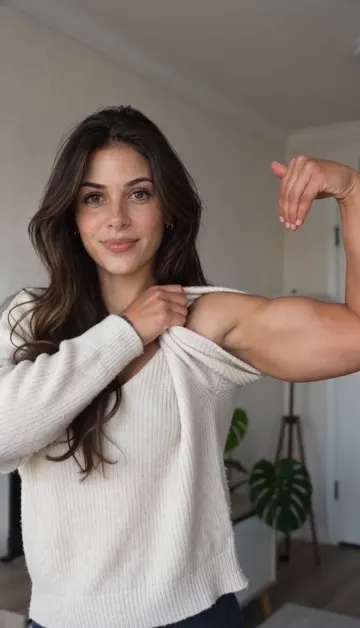
Arm movement
Keep room for the elbow and the hand as they move.
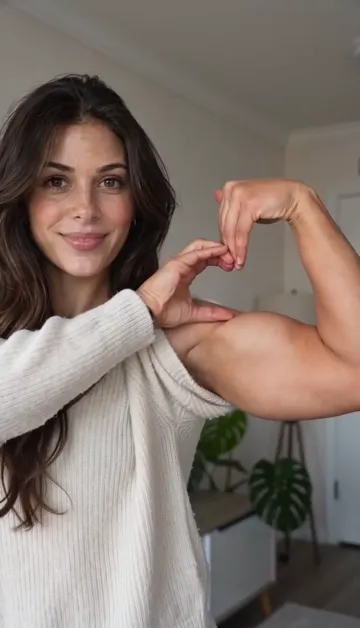
Heart reveal
Keep the finished shape visible and align your chosen audio cue.
Keep one clear audio layer
An echo often comes from playing the downloaded clip’s audio and an added copy together. Where separate volume controls are available, mute one layer and preview again. If you want the added bicep heart trend sound to lead, lower the original clip audio until it no longer competes.
For a voiceover version, keep your sentence short enough to finish before the reveal. Listen on your phone’s speaker as well as headphones: the words and musical cue should remain easy to hear. There is no universal volume percentage that fits every recording.
Avoid repeated exports while adjusting the sound. Keep the original video, make your timing decisions, and export the finished edit once you are satisfied.
If the bicep heart trend sound is unavailable
First check whether the issue affects only this sound or every video you play. If everything is silent, check the device and app volume. If other audio works, inspect the chosen sound’s availability message and try opening it from the reference post again.
For a published video that TikTok has muted, the platform’s sound removal guidance explains how to open View details, inspect the reason, and use Change sound when offered. Preview the replacement and adjust its timing before saving.
A replacement bicep heart trend sound may have a different lead-in. Recheck the reveal instead of assuming your old timing still works. Do not re-upload a restricted recording simply to avoid the restriction.
A quick note for promotional posts
If your clip promotes a brand, product, or service, TikTok recommends its Commercial Music Library. Being able to hear the bicep heart trend sound in someone else’s post does not establish permission for your promotion. Choose a suitable cleared track or use music for which you hold the necessary rights.
Questions before you add the music
Is there one official bicep heart trend sound?
We have not verified one recording as the official sound for every version. Follow the sound attached to the specific post you want to match.
Is Trendformusic the song title?
The label reported by the guides names an account. It does not establish a formal song title or songwriting credit.
Can I use another bicep heart trend sound?
Yes, choose audio you are allowed to use and adjust the reveal to it. The pose should remain understandable without relying on a particular song.
What comes after choosing the audio?
Check the final frame, caption, and posting settings. Our Bicep Heart on TikTok guide covers that next stage. Still need the clip? Make your Bicep Heart video from a photo, then return here to finish the sound.